

intro here
How to Make a Quick and Easy Class Yearbook
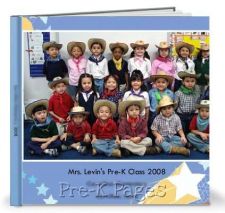
Today I’m going to show you how to use an on-line photo service to create a quick and easy, yet professional looking class yearbook.

In the pictures above you can see the class yearbook I created using an on-line service called Shutterfly. There are many services you can use to create yearbooks such as Snapfish and Picaboo; they are all close in price and similar to use. If you use these services frequently you will receive free offers, which is what I used to create the class yearbook pictured here.
I will use Shutterfly as an example since that is the one I am most familiar with. To get started you will need to create an account, which is free. Next, upload your digital photos to the Shuttefly website; they actually have a page about creating yearbooks. Once your photos are uploaded you can begin creating your photo book. Shutterfly offers the “simple path” and they will create the photo book for you with one click, or you can customize your book and lay the photos out on each page just the way you want using their “custom path”. I always choose the custom option because it’s quick and easy and turns out better than the automatically generated book. Once you have all the pictures laid out the way you want them you can review your book and make any necessary changes. The final step is the easiest, just follow the simple directions and pay for your purchase.
Depending on the type of population you work with you can decide how you want to circulate your yearbook. If you work with an at-risk population you may choose to create just one yearbook, send it home with each child to look at with their family and have them sign the inside cover. If you work with a more affluent population you might consider holding a fundraiser and selling the yearbooks. If you choose to make just one yearbook be prepared, every parent will beg you to order more because they absolutely love them.
If you liked this tip, check out my membership site, Teaching Trailblazers, where I help teachers just like you teach better, save time, and live more!